SEO Wins

Free SEO tools for site owners

Free Website SEO Checker

Audit a page, find technical and on-page SEO issues, and plan your next content update with tools that explain what they check.

Free, no account One page at a time Clear next steps

Start with a page audit

Check the HTML a search crawler can fetch. Add a search phrase for an on-page review.

No sign-up

The score is a SEOWins checklist aid, not a Google ranking score. No audit can promise a ranking.

Inside a page audit

Checks that lead to practical fixes

No mystery ranking score

What the audit checks

On-page
Title, meta description, headings, canonical, Open Graph, target keyword placement
Content
Word count, readability, frequent terms and phrases, thin or duplicate wording
Technical
Status codes, redirects, HTTPS, robots.txt, sitemap, response time, page weight
Structured data
JSON-LD, Microdata and RDFa, with required-field checks
AI search
Page-source structure, author and date fields, crawler access, optional llms.txt detection
Extras
Images, links, social tags, conversion signals, local SEO, e-commerce, tech stack

Bulk URL Checker

Check up to 50 pages at once for status, redirects, speed, title, description, H1, indexability and score.

Redirect Checker

Trace every hop a URL goes through, with status codes. Useful for site migrations and HTTPS or www setup.

Robots.txt Tester for Google and AI Crawlers

See whether Google, Bing and AI crawlers can access a URL, and which rule decides it. Edit the rules to test changes before you publish them.

Results for /
Enter a URL to test.

Security Headers Checker

Grade a site's HTTP security headers, see every response header, and list subdomains found in public certificate logs.

View Page Source

View a page's raw HTML as search engines receive it, plus every stylesheet, script, image and font it loads.

Domain Age & WHOIS Lookup

WHOIS registration, domain age, DNS records, SSL certificate, email security and Wayback Machine history.

Search Console Regex Builder

Build regex filters for the Queries and Pages reports in Google Search Console, then paste them into Filter → Custom (regex).

Presets
Regex


AI Content Brief Generator

Enter a keyword to get a writing brief: search intent, titles, an outline, FAQs, related terms and suggestions for clear content structure. Built from real Google searches.

AI SEO Assistant

Ask about SEO, content or AI search. Run an audit first and the assistant can answer questions about that page.

Suggestions

AI can make mistakes. Check important advice before acting on it.

Keyword Research Tool by Country

Explore country-specific Google Autocomplete suggestions, questions and A–Z variations. Suggestions are not search-volume estimates.

Already have a list? Analyze and group your keyword phrases.

Free · browser-based

SEO Keyword Analysis Tool

A free web page keyword analyzer: analyze the keywords on any web page, or turn a raw keyword list into a clearer content plan. Group related phrases, spot exact duplicates and review likely search intent before choosing which page to improve.

Your list is analyzed in this browser. SEOWins does not send it to a server. If you import from a URL, our server fetches that public page, as the site audit does. This tool does not estimate search volume or keyword difficulty.

Pulls phrases from the page title, headings and most repeated words into the list below.

Start with phrases from the Keyword Ideas tool or your own research. Choose a target country there to see local Google Autocomplete wording.

AI Search Insights

Review Search Console and Bing reports, then map their query or topic rows to any pages included in the files.

This tool reads CSV files in your browser. Your files are not uploaded to SEOWins. Google AI-feature metrics, Google web-search metrics and Bing AI citations are shown separately because they measure different things.

Import a report

Choose one report type. Importing replaces the previous rows for that source and leaves other sources as they are.

Export a CSV from the Search Console Generative AI performance report. Page-level files are supported; query details are not assumed if the export does not include them.

When importing multiple files for the same report, use non-overlapping date ranges. Overlapping exports can inflate totals.

No reports imported

Export a CSV from Google Search Console or Bing Webmaster Tools and import it above. The SEO Opportunities tab can review real query impressions and average positions from a Google Web search query export.

A new property may not have report data yet. Wait for actual data; SEOWins will not fill in estimated visibility or rankings.

AI Citation Tracker

Log what you observe when you run the same prompts on AI search platforms. Review linked citations, unlinked mentions and changes over time.

This is a manual sample log, not an AI rank checker. Answers vary by time, location and account; your entries show only the checks you recorded. Entries stay in this browser and are not uploaded.

Log an observation

Use a consistent prompt when you compare results. A linked citation means the answer included a clickable source to your tracked site.

Stored on this device only · Up to 500 observations

No observations yet

Run a prompt on an AI search platform, then log whether your tracked site was linked, mentioned, or not found. Recheck the same prompts later to compare your own sample.

Schema Markup Generator

Create JSON-LD structured data with the form, or generate it from an existing page with AI. Paste the result into your page's <head>.

Generate from a page

JSON-LD


Search Result Preview

Draft a page title and description, then compare an approximate search-result layout on desktop and mobile.

    This is an approximate preview. Google may show different text for different searches.

    Free SEO Tools for Audits, Keywords and AI Search

    Choose a free SEO tool for the task you need to complete. No account is required; AI tools have a fair-use limit.

    12 Quick SEO Wins You Can Make This Week

    A practical checklist for fixing indexing, titles, links and content—with free tools to help you check each change.

    Practical SEO, AEO and GEO Guides for Site Owners

    Clear, source-backed advice for improving search visibility, creating useful content, and measuring AI citations.

    How to Check a Website for SEO: A 14-Point Checklist

    Check indexability, content, links, and technical signals in a practical 14-point website SEO review.

    Keyword Mapping: Match Search Intent to the Right Page

    Turn keyword ideas into a page plan without creating a separate thin page for every wording variation.

    AEO vs GEO vs SEO: What the Terms Mean

    Understand where the labels overlap, choose work that fits your audience, and measure each visibility signal on its own terms.

    How to Optimize Content for AI Search

    A practical review of crawl access, clear answers, original evidence, page structure, and useful measurement.

    How to Track AI Search Citations and Mentions

    Use platform reports and repeatable prompt checks while keeping citations, mentions, visits, and impressions distinct.

    Best Free AEO Tools: A Practical Starter Stack

    Choose tools by task, from page checks and official visibility reports to manual citation samples and content planning.

    SEO Keyword Analysis: A Practical Workflow

    How to group relevant search terms, separate intent, and use real Search Console data without mistaking estimates for facts.

    Sample SEO Audit Report: What to Check and What to Fix First

    A plain-language example of a useful website audit report, from crawl access and page issues to a prioritized repair plan.

    Find SEO Quick Wins in Google Search Console

    A repeatable way to review high-impression queries, identify the page behind them, and decide whether a page update is worth testing.

    How Search Engine Optimization Works

    A clear guide to crawling, indexing, relevance and results—and what a site owner can influence at each step.

    How to Search a Page for Keywords

    Find any word on a page on desktop or mobile, search the hidden source, and check where an SEO keyword appears.

    Search Engine Optimization and Marketing: A Practical Guide

    Connect search intent, useful content, technical SEO, and marketing outcomes with a practical plan for multiple English-speaking markets.

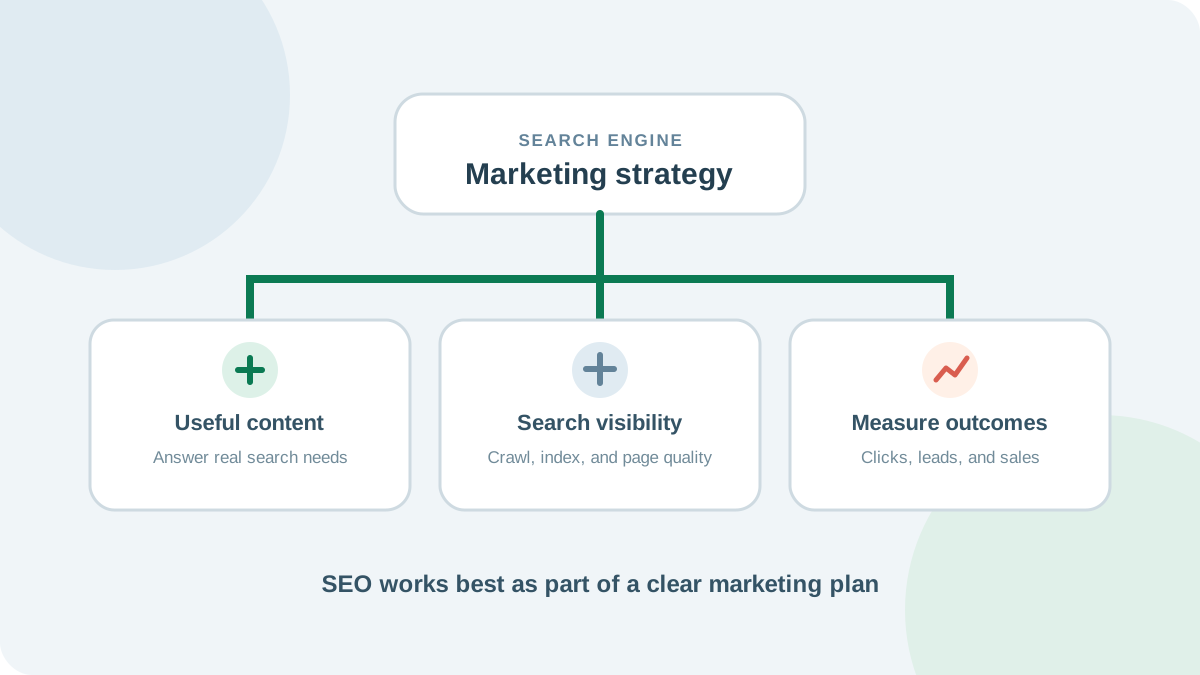
    Diagram connecting useful content, search visibility, and marketing outcomes.

    Search engine optimization and marketing work best when they support the same business goals. SEO helps the right people discover useful pages through search; the broader marketing plan helps those visitors understand your offer and decide what to do next.

    Quick answer: Set a measurable goal, learn what your audience searches for, publish a page that answers that need, make sure search engines can access it, and measure qualified visits and conversions over time. Treat rankings as one signal in that process, not the goal by themselves.

    What is search engine optimization and marketing?

    Search engine optimization (SEO) is the work of making a website easier for people and search engines to understand. SEO marketing connects that work to a marketing plan: the audiences you want to reach, the questions they have, the pages that can help, and the outcomes that matter to your business.

    A search visit can introduce someone to a brand, help them compare options, or bring them to a page where they can take action. SEO does not replace email, social media, paid campaigns, or sales. It gives those channels useful pages to point to and can help a business reach people when they are actively looking for an answer.

    Build an SEO marketing plan in five steps

    1. Choose a business outcome

    Start with the result you want: qualified enquiries, product sales, sign-ups, bookings, or another action. Pick a useful measure for that outcome. A traffic increase is only helpful when it brings people who might actually benefit from what you offer.

    2. Learn the audience's search needs

    Research the questions people ask before they are ready to act and the questions they ask when comparing solutions. Group related searches by intent, then choose the page that should answer each group. A practical keyword analysis workflow can help keep several similar phrases on one useful page instead of scattering them across thin articles.

    3. Make the best page for that need

    Give the page a clear title and heading, answer the main question early, explain important details, and show a sensible next step. Add examples, original experience, or a helpful tool where they improve the answer. Link to related information so visitors can continue without starting their search again.

    4. Check that search engines can reach it

    A useful page still needs to load, be accessible to Googlebot, and contain content that can be indexed. Review its status, canonical, robots directives, mobile layout, and internal links. Use a website SEO audit checklist to work through the main on-page and technical checks, then fix the issues that block users or search engines from using the page.

    5. Measure the result and improve the page

    Use Google Search Console to see which queries bring impressions and clicks, which pages appear, and how performance changes over time. Pair that with your analytics or sales data to understand whether visits lead to the outcome you chose. Google's Performance report includes query, page, country, device, and date views, along with average position; that position is an average and can vary by search and location. Google's Performance report guide explains the available dimensions and metrics.

    Connect SEO with the rest of marketing

    Use the same audience language across channels. A question that appears in sales calls or support tickets may make a strong guide. Share a genuinely useful guide in an email newsletter or a relevant social post. If a paid campaign tests a message, its results can suggest wording worth exploring in organic content, but paid clicks do not guarantee organic rankings.

    Give every page one primary job. An educational guide can answer a question and introduce a service naturally; a product page can explain features and help a visitor act. Keep the main call to action relevant to the page rather than forcing every visitor toward a sales form.

    Plan for the US, UK, Canada, and Australia

    Start with one clear English page if the answer and offer are the same across markets. Use wording that is easy to understand across regions, then adapt spelling, examples, pricing, shipping, or contact details where there is a real local difference. Avoid making near-identical country pages that only swap a place name.

    If you create distinct regional versions with meaningful differences, label those versions clearly and connect them with the appropriate locale signals. Google's guidance on multi-regional and multilingual sites explains when region-specific URLs and alternate-page annotations are useful. Check performance by country in Search Console before deciding that every market needs its own page.

    A simple 30-day starting plan

    • Week 1: choose one audience and one business outcome; review the search queries and pages already bringing relevant visits.
    • Week 2: select one content gap and outline a page that answers it better than your current pages.
    • Week 3: publish the page, link to it from relevant pages, and share it through an appropriate marketing channel.
    • Week 4: check indexing, impressions, clicks, and conversions; note what to improve and set a later review date.

    Search changes take time, and no checklist can promise a ranking. This short cycle helps you make a clear change, see what happened, and decide the next useful step.

    Frequently asked questions

    Is SEO the same as digital marketing?

    No. SEO is one part of digital marketing. It focuses on helping pages appear for relevant searches and making those pages useful when people arrive.

    Should I create separate SEO pages for the US and UK?

    Only when the content needs a real regional difference, such as local services, prices, regulations, or examples. If the answer is the same, one strong page is usually clearer than copies with small wording changes.

    How do I know whether SEO marketing is working?

    Track the outcome that matters to your business alongside search impressions and clicks. Compare similar time periods, check the queries and pages behind a change, and account for seasonal or campaign effects.

    References

    Site Authority Checker: How to Read Authority Scores

    Learn what site authority checkers estimate, how to assess backlink quality, and why vendor scores are not Google ranking metrics.

    SEO Ranking Checker: How to Check Your Google Rankings

    Check keyword performance in Search Console, understand average position, and track rankings by page, country, device, and date.

    About SEO Wins

    Free SEO and AI search tools for site owners, marketers and agencies.

    SEO Wins (seowins.net) started from a simple idea: the checks most people need to improve a website's search visibility should be quick, clear and free. Paste a URL, see what is holding the page back, and get a plain explanation of how to fix it.

    Search is changing. People use Google AI Overviews, ChatGPT, Perplexity and other AI assistants as well as classic results. Alongside traditional technical and on-page SEO, each SEOWins audit reports page-source and crawler-access signals. Its checklist cannot predict page rankings or whether an AI assistant will cite a page.

    What you can do here

    • Audit any page and download a white-label PDF report.
    • Check links, redirects, status codes and security headers.
    • Find country-specific keyword ideas, privately organize a keyword list, and plan content with AI briefs.
    • Review Search Console and Bing visibility reports and map query topics to pages.
    • Keep a private log of manually observed AI citations and mentions by platform.
    • Generate schema markup, test robots.txt rules and preview search snippets.

    How the tools work

    SEOWins fetches only the public pages you ask it to check, reads the HTML the way a crawler does and analyses it in your browser. Keyword lists entered in the Keyword Analysis tool stay in your browser and are not uploaded; that tool does not supply search-volume estimates. AI features can make mistakes, so check important facts before acting on them.

    Guides and corrections

    SEO Wins was founded by Dilum Ranasinghe, who builds the tools and writes the guides. Where advice depends on a search or platform rule, the guide links to the relevant primary documentation. Tool descriptions explain what each check measures and its limits; results are not a promise of rankings or citations.

    If you spot an error or outdated detail, email us the page address and the correction you recommend. We use that feedback to improve the site.

    Questions or suggestions? Email support@seowins.net.

    Dilum Ranasinghe

    Founder of SEO Wins

    Dilum Ranasinghe founded SEO Wins and builds its tools and guides. Dilum also runs FormulaCreator, a library of free online calculators, and Bark.lk, an online pet shop in Sri Lanka. All three depend on search traffic, so the checks built into SEO Wins are the same ones used to keep those sites crawlable, fast and easy to find.

    What Dilum works on

    • Building free SEO and AI search tools: site audits, link and redirect checks, keyword research, schema and robots.txt testing.
    • Technical SEO for custom-built and e-commerce websites: crawlability, indexing, structured data and page speed.
    • Writing practical guides on SEO, answer engine optimisation (AEO) and generative engine optimisation (GEO).

    Editorial approach

    Each guide on SEO Wins explains what to check and how to fix it, links to primary documentation from Google, Bing or the relevant platform where a rule matters, and avoids promising rankings or AI citations. Guides are reviewed and updated when search features or platform rules change, and the update date is shown at the top of each article.

    Spotted an error or something out of date? Email support@seowins.net with the page address and the correction.

    Guides by Dilum

    Find Dilum online

    LinkedIn: Dilum Ranasinghe

    Privacy Policy

    Last updated: 25 October 2026

    This policy explains what happens to information when you use seowins.net. SEOWins does not offer accounts and does not ask for your name, email address or payment details.

    URLs and domains you check

    When you run a tool, the address you enter is sent to our server, which fetches that public page (and files such as robots.txt or DNS records) on your behalf. The results are returned to your browser and analysed there. We do not store the URLs you check or the results.

    AI features

    The AI Content Brief, AI Assistant, rewrite and schema tools send your request, and any audit summary or imported report context you choose to share, to our AI provider, Groq, to generate an answer. Do not include personal or confidential information in AI requests. To prevent abuse, we keep a short-lived count of AI requests per IP address in memory; it is not stored permanently.

    Analytics

    We use Google Analytics to understand how many people visit and which tools they use. Google Analytics sets cookies and collects information such as pages viewed, approximate location, device and browser. We remove the URLs and keywords you enter from the page addresses sent to Google Analytics. You can block analytics with your browser settings, an ad blocker or the Google Analytics opt-out browser add-on.

    Advertising cookies (when ads are enabled)

    If ads are displayed on this site through Google AdSense, Google and other third-party vendors may use cookies or similar technologies to serve ads based on your prior visits to this site or other websites. Google's use of advertising cookies enables Google and its partners to serve ads based on your visits to this site and other sites on the internet.

    You can manage personalized advertising in Google Ads Settings. You can also opt out of some third-party vendors' personalized advertising at aboutads.info. If we enable additional ad networks, we will identify them here and link to their privacy and opt-out information where available.

    Storage in your browser

    Your theme choice and any PDF report branding you enter are saved in your browser's local storage so they are remembered next time. They never leave your device, and you can clear them at any time through your browser settings.

    Imported search reports

    CSV files used in AI Search Insights are read and analyzed in your browser. The imported rows stay in page memory only and are cleared when you refresh or leave the page; the files are not uploaded to SEOWins.

    Keyword analysis

    Keyword Analysis groups the phrases you paste in your browser and exports a CSV on your device. The pasted keyword list is not sent to SEOWins and is cleared when you leave or refresh the page.

    AI Citation Tracker entries

    Prompts, tracked domains, notes and citation observations are saved in your browser's local storage so they remain available on this device. They are not sent to SEOWins. Export a CSV backup before clearing browser data; use the tracker’s Clear log button to remove all saved observations.

    Hosting

    The site is hosted on Vercel, which processes standard request information such as IP addresses to deliver and secure the service.

    Contact

    For privacy questions, email support@seowins.net.